> ## Documentation Index
> Fetch the complete documentation index at: https://docs-staging-fix-docs-5525.mintlify.site/llms.txt
> Use this file to discover all available pages before exploring further.

> Configure an update policy form using Forms for Actions

# Use Cases: Configure an update policy form using Forms

<Card title="Before you start">
  1. Create a [Machine-to-Machine Application](/docs/get-started/auth0-overview/create-applications/machine-to-machine-apps) with the following scopes enabled:

  * `read:users`
  * `update:users`
  * `create:users`
  * `read:users_app_metadata`
  * `update:users_app_metadata`
  * `create:users_app_metadata`

  2. Add a [Vault connection](/docs/customize/forms/vault) using the M2M application credentials.
</Card>

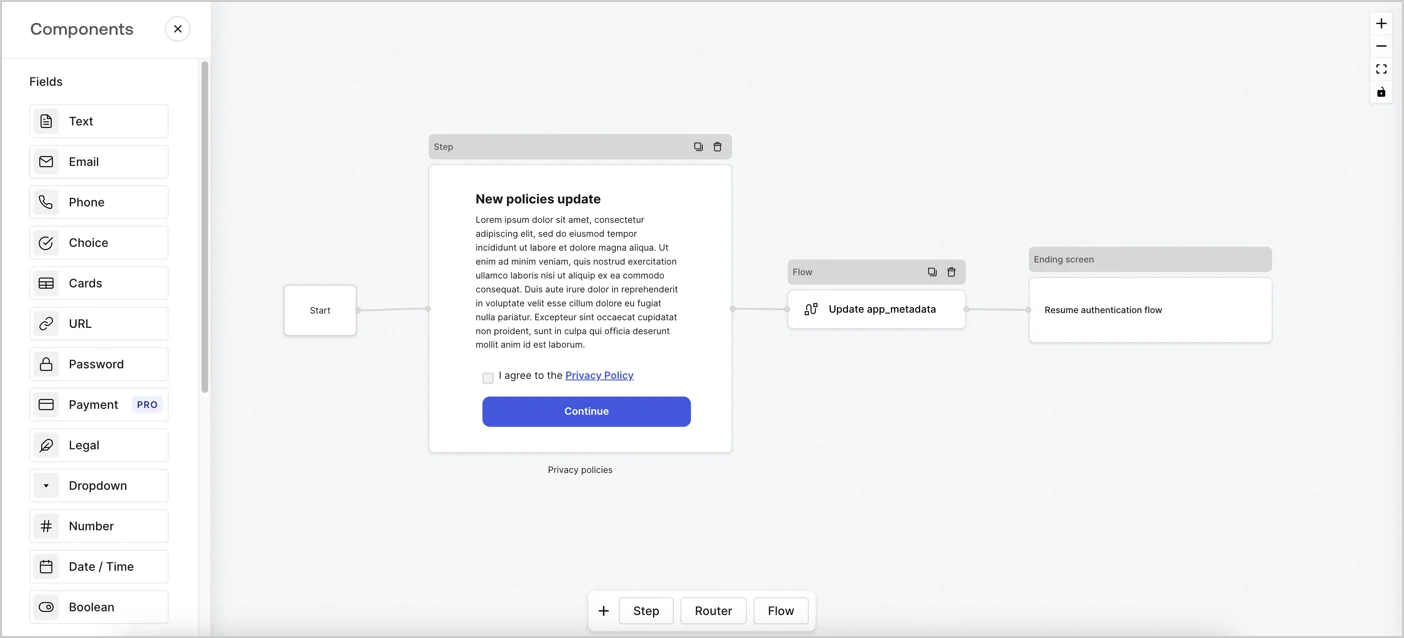
Forms for Actions allows you to create custom privacy policies flows and store the consent under the `app_metadata` object.
<Frame>
  <img src="https://mintcdn.com/docs-staging-fix-docs-5525/LKxbflL0611mf8tH/docs/images/cdy7uua7fh8z/6i68dMvHDTijfRmSgN1x8Q/ad900e7d4c0fb34645921435472b8684/privavy-policy-form.png?fit=max&auto=format&n=LKxbflL0611mf8tH&q=85&s=f6d88e121457a25df841e6d7b6c2608e" alt="Dashboard > Actions > Forms > Privacy policy use case" data-og-width="1404" width="1404" data-og-height="638" height="638" data-path="docs/images/cdy7uua7fh8z/6i68dMvHDTijfRmSgN1x8Q/ad900e7d4c0fb34645921435472b8684/privavy-policy-form.png" data-optimize="true" data-opv="3" srcset="https://mintcdn.com/docs-staging-fix-docs-5525/LKxbflL0611mf8tH/docs/images/cdy7uua7fh8z/6i68dMvHDTijfRmSgN1x8Q/ad900e7d4c0fb34645921435472b8684/privavy-policy-form.png?w=280&fit=max&auto=format&n=LKxbflL0611mf8tH&q=85&s=3901286acca33913b4c97dfc080fbd2a 280w, https://mintcdn.com/docs-staging-fix-docs-5525/LKxbflL0611mf8tH/docs/images/cdy7uua7fh8z/6i68dMvHDTijfRmSgN1x8Q/ad900e7d4c0fb34645921435472b8684/privavy-policy-form.png?w=560&fit=max&auto=format&n=LKxbflL0611mf8tH&q=85&s=57aefdab8190d2f666ce3ecc1a8460eb 560w, https://mintcdn.com/docs-staging-fix-docs-5525/LKxbflL0611mf8tH/docs/images/cdy7uua7fh8z/6i68dMvHDTijfRmSgN1x8Q/ad900e7d4c0fb34645921435472b8684/privavy-policy-form.png?w=840&fit=max&auto=format&n=LKxbflL0611mf8tH&q=85&s=b7da5a03559f1ce1f9ece53c4624fdf7 840w, https://mintcdn.com/docs-staging-fix-docs-5525/LKxbflL0611mf8tH/docs/images/cdy7uua7fh8z/6i68dMvHDTijfRmSgN1x8Q/ad900e7d4c0fb34645921435472b8684/privavy-policy-form.png?w=1100&fit=max&auto=format&n=LKxbflL0611mf8tH&q=85&s=7efc18be9e36038329965d95de022e58 1100w, https://mintcdn.com/docs-staging-fix-docs-5525/LKxbflL0611mf8tH/docs/images/cdy7uua7fh8z/6i68dMvHDTijfRmSgN1x8Q/ad900e7d4c0fb34645921435472b8684/privavy-policy-form.png?w=1650&fit=max&auto=format&n=LKxbflL0611mf8tH&q=85&s=84cc9e1e6cda1bc2ae271fdfa407ae7a 1650w, https://mintcdn.com/docs-staging-fix-docs-5525/LKxbflL0611mf8tH/docs/images/cdy7uua7fh8z/6i68dMvHDTijfRmSgN1x8Q/ad900e7d4c0fb34645921435472b8684/privavy-policy-form.png?w=2500&fit=max&auto=format&n=LKxbflL0611mf8tH&q=85&s=e665bf292d146ce6d9b0b4a30e812e2e 2500w" />
</Frame>

The sections below outline how you can create an Update Policy form using nodes and flows, along with steps for adding your form to a [Post Login](/docs/customize/actions/explore-triggers/signup-and-login-triggers/login-trigger) Action.

## Create a form from scratch

Follow these steps to create a form to gather information:

1. Open the Form editor by selecting **Auth0 Dashboard > Actions > Forms.**
2. Select **Create Form** > **Start from scratch**.

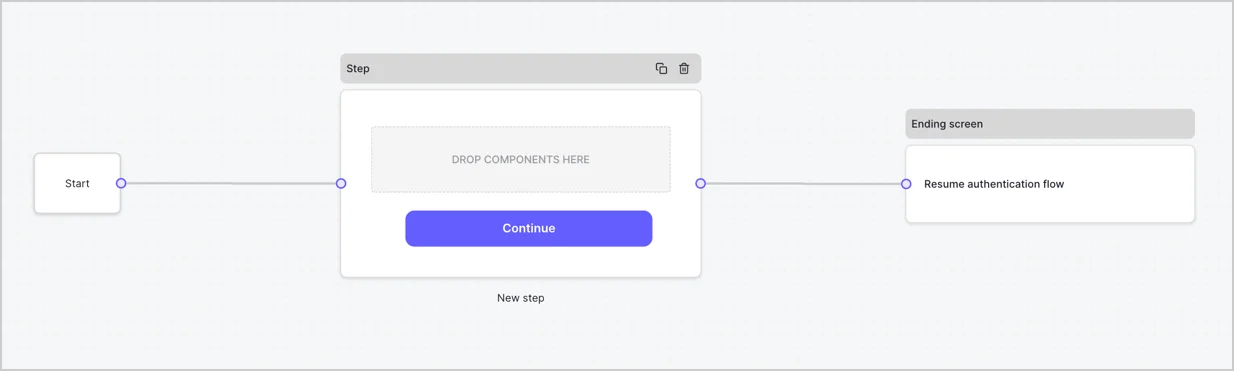
By default, a new form contains a Start node, a Step node, and an Ending screen node.
<Frame>
  <img src="https://mintcdn.com/docs-staging-fix-docs-5525/9WyS3_wHFPjcZdTs/docs/images/cdy7uua7fh8z/2TZ9jSjgEcARFpULI6hz4R/a4319a1bd482f2ee5cc23100fdb2f42c/New-form-Forms-for-action-use-case.png?fit=max&auto=format&n=9WyS3_wHFPjcZdTs&q=85&s=58fd7f955c75299349d805372b73faa3" alt="Dashboard > Forms > Use Cases > Form" data-og-width="1234" width="1234" data-og-height="371" height="371" data-path="docs/images/cdy7uua7fh8z/2TZ9jSjgEcARFpULI6hz4R/a4319a1bd482f2ee5cc23100fdb2f42c/New-form-Forms-for-action-use-case.png" data-optimize="true" data-opv="3" srcset="https://mintcdn.com/docs-staging-fix-docs-5525/9WyS3_wHFPjcZdTs/docs/images/cdy7uua7fh8z/2TZ9jSjgEcARFpULI6hz4R/a4319a1bd482f2ee5cc23100fdb2f42c/New-form-Forms-for-action-use-case.png?w=280&fit=max&auto=format&n=9WyS3_wHFPjcZdTs&q=85&s=e31046ee1c058191f18d200b2c1d6b83 280w, https://mintcdn.com/docs-staging-fix-docs-5525/9WyS3_wHFPjcZdTs/docs/images/cdy7uua7fh8z/2TZ9jSjgEcARFpULI6hz4R/a4319a1bd482f2ee5cc23100fdb2f42c/New-form-Forms-for-action-use-case.png?w=560&fit=max&auto=format&n=9WyS3_wHFPjcZdTs&q=85&s=0c84ce77cf1307dcf03f7cc12349916c 560w, https://mintcdn.com/docs-staging-fix-docs-5525/9WyS3_wHFPjcZdTs/docs/images/cdy7uua7fh8z/2TZ9jSjgEcARFpULI6hz4R/a4319a1bd482f2ee5cc23100fdb2f42c/New-form-Forms-for-action-use-case.png?w=840&fit=max&auto=format&n=9WyS3_wHFPjcZdTs&q=85&s=d9c70b73d7a543bad5cf31564745a0e8 840w, https://mintcdn.com/docs-staging-fix-docs-5525/9WyS3_wHFPjcZdTs/docs/images/cdy7uua7fh8z/2TZ9jSjgEcARFpULI6hz4R/a4319a1bd482f2ee5cc23100fdb2f42c/New-form-Forms-for-action-use-case.png?w=1100&fit=max&auto=format&n=9WyS3_wHFPjcZdTs&q=85&s=db7baebfa3cd79d351141244744be3e6 1100w, https://mintcdn.com/docs-staging-fix-docs-5525/9WyS3_wHFPjcZdTs/docs/images/cdy7uua7fh8z/2TZ9jSjgEcARFpULI6hz4R/a4319a1bd482f2ee5cc23100fdb2f42c/New-form-Forms-for-action-use-case.png?w=1650&fit=max&auto=format&n=9WyS3_wHFPjcZdTs&q=85&s=82a5338a8e8fd41132580cbe4bf4031e 1650w, https://mintcdn.com/docs-staging-fix-docs-5525/9WyS3_wHFPjcZdTs/docs/images/cdy7uua7fh8z/2TZ9jSjgEcARFpULI6hz4R/a4319a1bd482f2ee5cc23100fdb2f42c/New-form-Forms-for-action-use-case.png?w=2500&fit=max&auto=format&n=9WyS3_wHFPjcZdTs&q=85&s=a4ba6aa1535dfa82caaeaac15ed395a4 2500w" />
</Frame>

### Configure the Step node

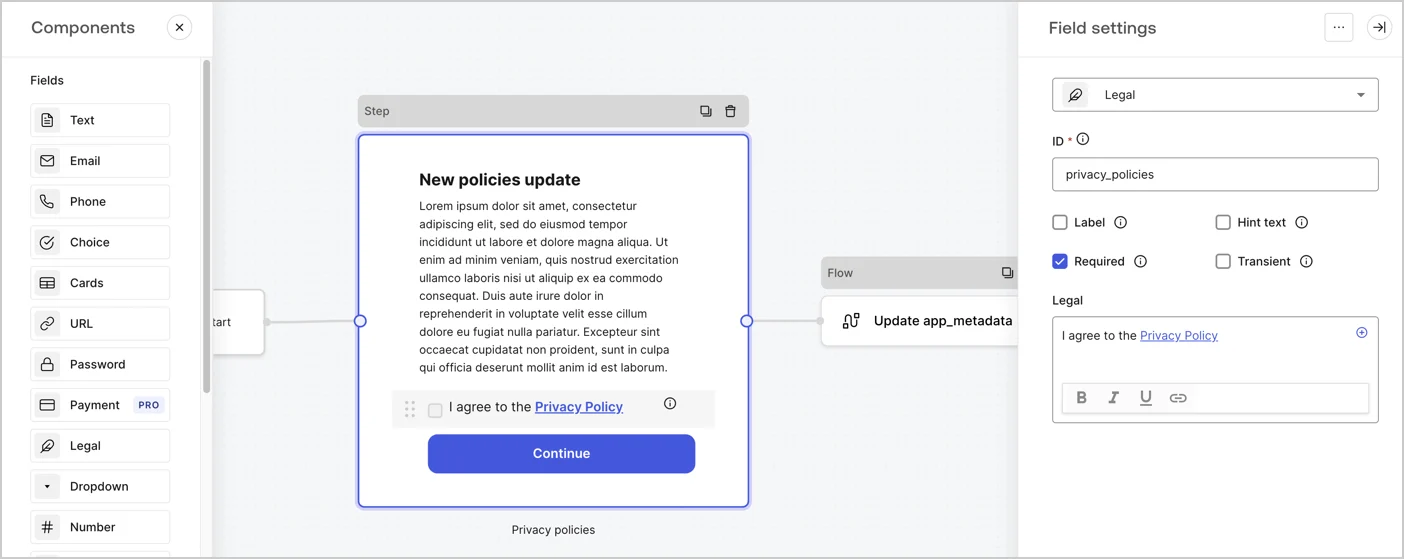
The Step node is the graphical interface visible to users. Add [Fields](/docs/customize/forms/nodes-and-components) to the Step node to collect the new agreement acceptance value by following these steps:

1. Drag a **Rich text** field from the **Components menu** into the **Step** node.

   * **Rich text**: Enter a description of your privacy policies updates.
   * Select **Save**.
2. Drag a **Legal** field into the **Step** node.

   * **ID**: Enter `privacy_policies`.
   * **Required**: Enable the checkbox.
   * **Legal**: Enter `I agree to the Privacy Policy`.
   * Select **Save**.
3. Select **Publish** to save.
<Frame>
  <img src="https://mintcdn.com/docs-staging-fix-docs-5525/P-h0NsqqMRLoQHPy/docs/images/cdy7uua7fh8z/59zFFjQjAnjogkc2QGIqqJ/0ad66b1b636544122aa4e65968b76c2c/privacy-policy-step-node.png?fit=max&auto=format&n=P-h0NsqqMRLoQHPy&q=85&s=973a9b34a0d74ca8af6f352f2457e046" alt="Dashboard > Actions > Forms > Use case privacy policy step node" data-og-width="1404" width="1404" data-og-height="559" height="559" data-path="docs/images/cdy7uua7fh8z/59zFFjQjAnjogkc2QGIqqJ/0ad66b1b636544122aa4e65968b76c2c/privacy-policy-step-node.png" data-optimize="true" data-opv="3" srcset="https://mintcdn.com/docs-staging-fix-docs-5525/P-h0NsqqMRLoQHPy/docs/images/cdy7uua7fh8z/59zFFjQjAnjogkc2QGIqqJ/0ad66b1b636544122aa4e65968b76c2c/privacy-policy-step-node.png?w=280&fit=max&auto=format&n=P-h0NsqqMRLoQHPy&q=85&s=d1862281fe427462355c4d5537cc550d 280w, https://mintcdn.com/docs-staging-fix-docs-5525/P-h0NsqqMRLoQHPy/docs/images/cdy7uua7fh8z/59zFFjQjAnjogkc2QGIqqJ/0ad66b1b636544122aa4e65968b76c2c/privacy-policy-step-node.png?w=560&fit=max&auto=format&n=P-h0NsqqMRLoQHPy&q=85&s=8d8a406f76e480ab6770780af69e63fc 560w, https://mintcdn.com/docs-staging-fix-docs-5525/P-h0NsqqMRLoQHPy/docs/images/cdy7uua7fh8z/59zFFjQjAnjogkc2QGIqqJ/0ad66b1b636544122aa4e65968b76c2c/privacy-policy-step-node.png?w=840&fit=max&auto=format&n=P-h0NsqqMRLoQHPy&q=85&s=2465d5dc32f15edf824278802e95bdca 840w, https://mintcdn.com/docs-staging-fix-docs-5525/P-h0NsqqMRLoQHPy/docs/images/cdy7uua7fh8z/59zFFjQjAnjogkc2QGIqqJ/0ad66b1b636544122aa4e65968b76c2c/privacy-policy-step-node.png?w=1100&fit=max&auto=format&n=P-h0NsqqMRLoQHPy&q=85&s=08d7dc537a3a32381037c83305376b20 1100w, https://mintcdn.com/docs-staging-fix-docs-5525/P-h0NsqqMRLoQHPy/docs/images/cdy7uua7fh8z/59zFFjQjAnjogkc2QGIqqJ/0ad66b1b636544122aa4e65968b76c2c/privacy-policy-step-node.png?w=1650&fit=max&auto=format&n=P-h0NsqqMRLoQHPy&q=85&s=cbffbd7cb6196273b74cb85b6dbce5de 1650w, https://mintcdn.com/docs-staging-fix-docs-5525/P-h0NsqqMRLoQHPy/docs/images/cdy7uua7fh8z/59zFFjQjAnjogkc2QGIqqJ/0ad66b1b636544122aa4e65968b76c2c/privacy-policy-step-node.png?w=2500&fit=max&auto=format&n=P-h0NsqqMRLoQHPy&q=85&s=728aa380921cca9cb6f22bc1410111dd 2500w" />
</Frame>

### Configure the Flow node

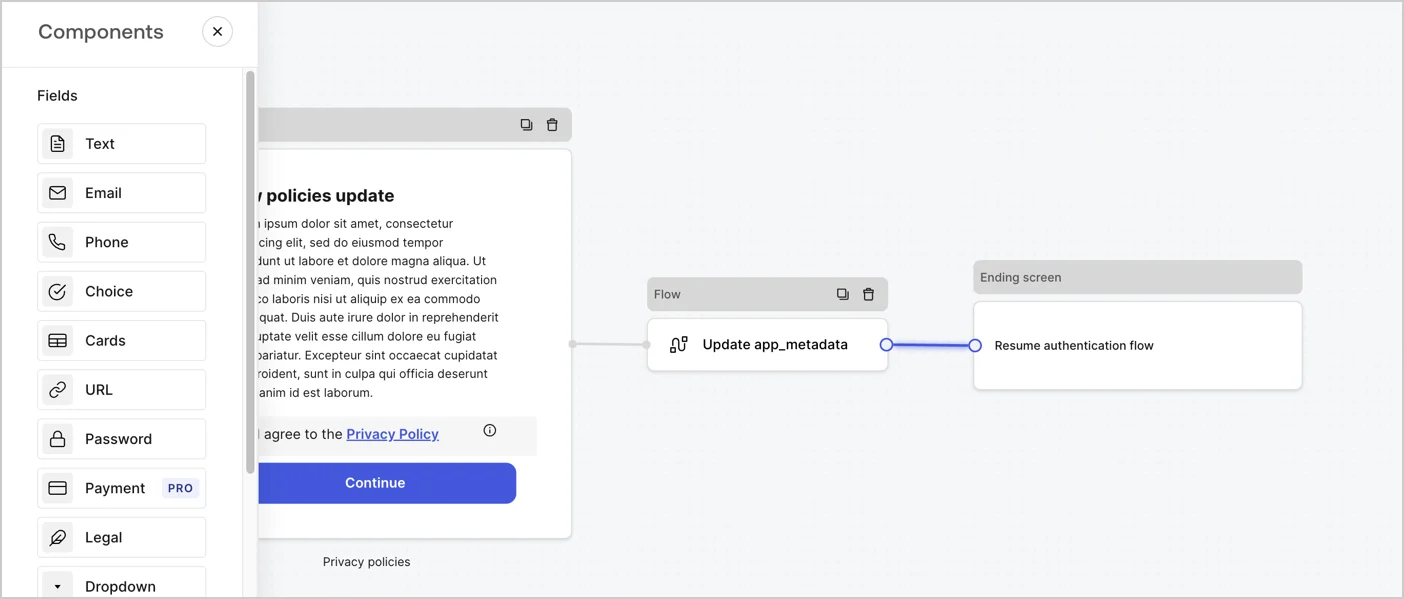
Add a **Flow** node after the **Step** node to update the `app_metadata` and resume the authentication flow by following these steps:

1. Select **Flow** from the bottom of the Form editor.
2. Remove the existing link between the **Step** and **Ending Screen** nodes.
3. Select the new **Flow** > **Click to add a flow** > **Create a new flow.**

   * Enter `Update app_metadata` in the **Name** field.
   * Select **Create**.
   * Select **Save**.
4. Link the **Flow** node to the **Step** and **Ending Screen** nodes as pictured below.
5. Select **Publish** to save.
<Frame>
  <img src="https://mintcdn.com/docs-staging-fix-docs-5525/LKxbflL0611mf8tH/docs/images/cdy7uua7fh8z/6YIkzm7SrpM9LW76AXuRzh/353c518fe82bbaa440836da1d83596d6/link-policies.png?fit=max&auto=format&n=LKxbflL0611mf8tH&q=85&s=2b64376ed6d255d8d4c22de9f400dbf6" alt="Dashboard > Actions > Forms > Form" data-og-width="1404" width="1404" data-og-height="599" height="599" data-path="docs/images/cdy7uua7fh8z/6YIkzm7SrpM9LW76AXuRzh/353c518fe82bbaa440836da1d83596d6/link-policies.png" data-optimize="true" data-opv="3" srcset="https://mintcdn.com/docs-staging-fix-docs-5525/LKxbflL0611mf8tH/docs/images/cdy7uua7fh8z/6YIkzm7SrpM9LW76AXuRzh/353c518fe82bbaa440836da1d83596d6/link-policies.png?w=280&fit=max&auto=format&n=LKxbflL0611mf8tH&q=85&s=3dcc839e8312e15e9a13fef29e3b9cd4 280w, https://mintcdn.com/docs-staging-fix-docs-5525/LKxbflL0611mf8tH/docs/images/cdy7uua7fh8z/6YIkzm7SrpM9LW76AXuRzh/353c518fe82bbaa440836da1d83596d6/link-policies.png?w=560&fit=max&auto=format&n=LKxbflL0611mf8tH&q=85&s=ca950bf5ce78484cbf0a1f90c381eced 560w, https://mintcdn.com/docs-staging-fix-docs-5525/LKxbflL0611mf8tH/docs/images/cdy7uua7fh8z/6YIkzm7SrpM9LW76AXuRzh/353c518fe82bbaa440836da1d83596d6/link-policies.png?w=840&fit=max&auto=format&n=LKxbflL0611mf8tH&q=85&s=a79f2931ff54f2c0aff51d7a49cd4d97 840w, https://mintcdn.com/docs-staging-fix-docs-5525/LKxbflL0611mf8tH/docs/images/cdy7uua7fh8z/6YIkzm7SrpM9LW76AXuRzh/353c518fe82bbaa440836da1d83596d6/link-policies.png?w=1100&fit=max&auto=format&n=LKxbflL0611mf8tH&q=85&s=b836ecde048a20309552740eb3b53b08 1100w, https://mintcdn.com/docs-staging-fix-docs-5525/LKxbflL0611mf8tH/docs/images/cdy7uua7fh8z/6YIkzm7SrpM9LW76AXuRzh/353c518fe82bbaa440836da1d83596d6/link-policies.png?w=1650&fit=max&auto=format&n=LKxbflL0611mf8tH&q=85&s=adba71452c3d10e194208a9becbf12c3 1650w, https://mintcdn.com/docs-staging-fix-docs-5525/LKxbflL0611mf8tH/docs/images/cdy7uua7fh8z/6YIkzm7SrpM9LW76AXuRzh/353c518fe82bbaa440836da1d83596d6/link-policies.png?w=2500&fit=max&auto=format&n=LKxbflL0611mf8tH&q=85&s=40254f4a03be5ddbccdad976fef51c90 2500w" />
</Frame>

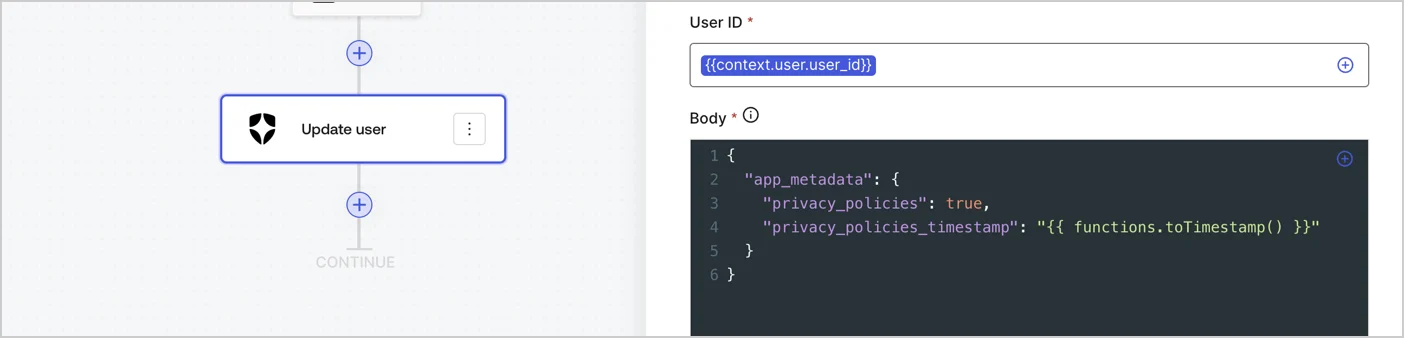
Add an Auth0 Update user action to the flow by following these steps:

1. Select the **Flow** **Update app\_metadata** > **Edit flow** to open the Flow editor in a new tab.
2. Below the StartAction, select the **+** icon to add an **Update user** action. Complete the fields below, then select **Save** to continue.

   * **Connection**: Select from the dropdown the Vault connection to your M2M application.

   * **User ID**: Enter `{{context.user.user_id}}`.

   * **Body**: Copy and paste the following code to update the app\_metadata with the privacy\_policies and privacy\_policies\_timestamp properties.

     ```text lines theme={null}
     {
       "app_metadata": {
         "privacy_policies": true,
         "privacy_policies_timestamp": "{{ functions.toTimestamp() }}"
       }
     }
     ```

   * Select **Save**.
3. Select **Publish** to save.
<Frame>
  <img src="https://mintcdn.com/docs-staging-fix-docs-5525/rAA1bA-FcGCrldJB/docs/images/cdy7uua7fh8z/CvMNIwWrOUwaFW4X3G28p/1fb70ae57a20749d9ffaaba8dc0b7e26/update-user-privacy.png?fit=max&auto=format&n=rAA1bA-FcGCrldJB&q=85&s=71e2a6952c396fb80fcd969177a7602c" alt="Dashboard > Actions > Forms > User case privacy policy code" data-og-width="1404" width="1404" data-og-height="338" height="338" data-path="docs/images/cdy7uua7fh8z/CvMNIwWrOUwaFW4X3G28p/1fb70ae57a20749d9ffaaba8dc0b7e26/update-user-privacy.png" data-optimize="true" data-opv="3" srcset="https://mintcdn.com/docs-staging-fix-docs-5525/rAA1bA-FcGCrldJB/docs/images/cdy7uua7fh8z/CvMNIwWrOUwaFW4X3G28p/1fb70ae57a20749d9ffaaba8dc0b7e26/update-user-privacy.png?w=280&fit=max&auto=format&n=rAA1bA-FcGCrldJB&q=85&s=55ff45f12c86a4a90eecdcf5462a463e 280w, https://mintcdn.com/docs-staging-fix-docs-5525/rAA1bA-FcGCrldJB/docs/images/cdy7uua7fh8z/CvMNIwWrOUwaFW4X3G28p/1fb70ae57a20749d9ffaaba8dc0b7e26/update-user-privacy.png?w=560&fit=max&auto=format&n=rAA1bA-FcGCrldJB&q=85&s=d5c905c7c796c337ba07935efdfbd85a 560w, https://mintcdn.com/docs-staging-fix-docs-5525/rAA1bA-FcGCrldJB/docs/images/cdy7uua7fh8z/CvMNIwWrOUwaFW4X3G28p/1fb70ae57a20749d9ffaaba8dc0b7e26/update-user-privacy.png?w=840&fit=max&auto=format&n=rAA1bA-FcGCrldJB&q=85&s=9a0b7ee619586f8bdcdabf4232d0e41a 840w, https://mintcdn.com/docs-staging-fix-docs-5525/rAA1bA-FcGCrldJB/docs/images/cdy7uua7fh8z/CvMNIwWrOUwaFW4X3G28p/1fb70ae57a20749d9ffaaba8dc0b7e26/update-user-privacy.png?w=1100&fit=max&auto=format&n=rAA1bA-FcGCrldJB&q=85&s=0f8a917ed1835d0e96eee32b64541bb6 1100w, https://mintcdn.com/docs-staging-fix-docs-5525/rAA1bA-FcGCrldJB/docs/images/cdy7uua7fh8z/CvMNIwWrOUwaFW4X3G28p/1fb70ae57a20749d9ffaaba8dc0b7e26/update-user-privacy.png?w=1650&fit=max&auto=format&n=rAA1bA-FcGCrldJB&q=85&s=bee3f9fbc851f03ea3007c025b96ad34 1650w, https://mintcdn.com/docs-staging-fix-docs-5525/rAA1bA-FcGCrldJB/docs/images/cdy7uua7fh8z/CvMNIwWrOUwaFW4X3G28p/1fb70ae57a20749d9ffaaba8dc0b7e26/update-user-privacy.png?w=2500&fit=max&auto=format&n=rAA1bA-FcGCrldJB&q=85&s=4796e621dac780fce45e1453425dc560 2500w" />
</Frame>

<Callout icon="file-lines" color="#0EA5E9" iconType="regular">
  The flow **Update app\_metadata** adds a `privacy_policies true` value to the app`_metadata` object and also generates a timestamp with a [helper function.](/docs/customize/forms/variables)
</Callout>

## Retrieve the form render code

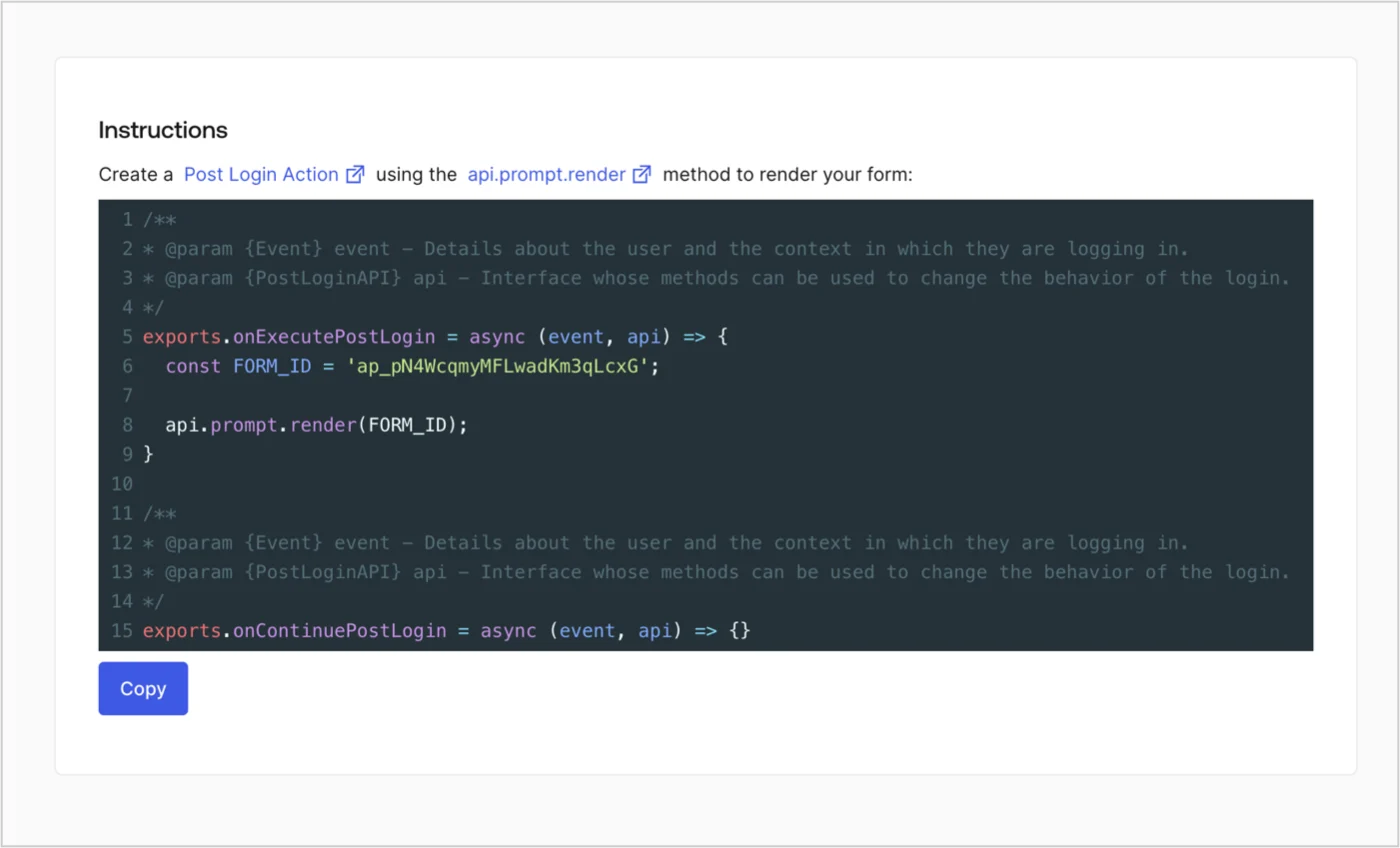
Retrieve your form render code to visually render the form with a custom Post Login Action by following these steps:

* From the Form editor, select **`<> Render`**.
* Select **Copy**.
<Frame>
  <img src="https://mintcdn.com/docs-staging-fix-docs-5525/slU6Lky9GpH8Dxv9/docs/images/cdy7uua7fh8z/2EIUzc539sq9lwoTKbjoJv/496a864c0fc44a782c9cadca119dbfb0/embed.png?fit=max&auto=format&n=slU6Lky9GpH8Dxv9&q=85&s=7416ad8f9ed504f20877005481f646bf" alt="Dashboard > Actions > Forms > Form > Embed" data-og-width="1400" width="1400" data-og-height="848" height="848" data-path="docs/images/cdy7uua7fh8z/2EIUzc539sq9lwoTKbjoJv/496a864c0fc44a782c9cadca119dbfb0/embed.png" data-optimize="true" data-opv="3" srcset="https://mintcdn.com/docs-staging-fix-docs-5525/slU6Lky9GpH8Dxv9/docs/images/cdy7uua7fh8z/2EIUzc539sq9lwoTKbjoJv/496a864c0fc44a782c9cadca119dbfb0/embed.png?w=280&fit=max&auto=format&n=slU6Lky9GpH8Dxv9&q=85&s=1ab90ab8cdc0ab4796b5d5ea958f936e 280w, https://mintcdn.com/docs-staging-fix-docs-5525/slU6Lky9GpH8Dxv9/docs/images/cdy7uua7fh8z/2EIUzc539sq9lwoTKbjoJv/496a864c0fc44a782c9cadca119dbfb0/embed.png?w=560&fit=max&auto=format&n=slU6Lky9GpH8Dxv9&q=85&s=eb39460161d67097a55f51da71e47c9e 560w, https://mintcdn.com/docs-staging-fix-docs-5525/slU6Lky9GpH8Dxv9/docs/images/cdy7uua7fh8z/2EIUzc539sq9lwoTKbjoJv/496a864c0fc44a782c9cadca119dbfb0/embed.png?w=840&fit=max&auto=format&n=slU6Lky9GpH8Dxv9&q=85&s=60255591e7460dbb510b487b6314fe75 840w, https://mintcdn.com/docs-staging-fix-docs-5525/slU6Lky9GpH8Dxv9/docs/images/cdy7uua7fh8z/2EIUzc539sq9lwoTKbjoJv/496a864c0fc44a782c9cadca119dbfb0/embed.png?w=1100&fit=max&auto=format&n=slU6Lky9GpH8Dxv9&q=85&s=fff8dc43ff199703a491272b1db1834e 1100w, https://mintcdn.com/docs-staging-fix-docs-5525/slU6Lky9GpH8Dxv9/docs/images/cdy7uua7fh8z/2EIUzc539sq9lwoTKbjoJv/496a864c0fc44a782c9cadca119dbfb0/embed.png?w=1650&fit=max&auto=format&n=slU6Lky9GpH8Dxv9&q=85&s=4dfdc6c3c9558134647f31137cd76e73 1650w, https://mintcdn.com/docs-staging-fix-docs-5525/slU6Lky9GpH8Dxv9/docs/images/cdy7uua7fh8z/2EIUzc539sq9lwoTKbjoJv/496a864c0fc44a782c9cadca119dbfb0/embed.png?w=2500&fit=max&auto=format&n=slU6Lky9GpH8Dxv9&q=85&s=15f236f64c669e6bc1730ac6ba7f733d 2500w" />
</Frame>

## Create a Post Login Action

Create a post-login Action to render your form by following these steps:

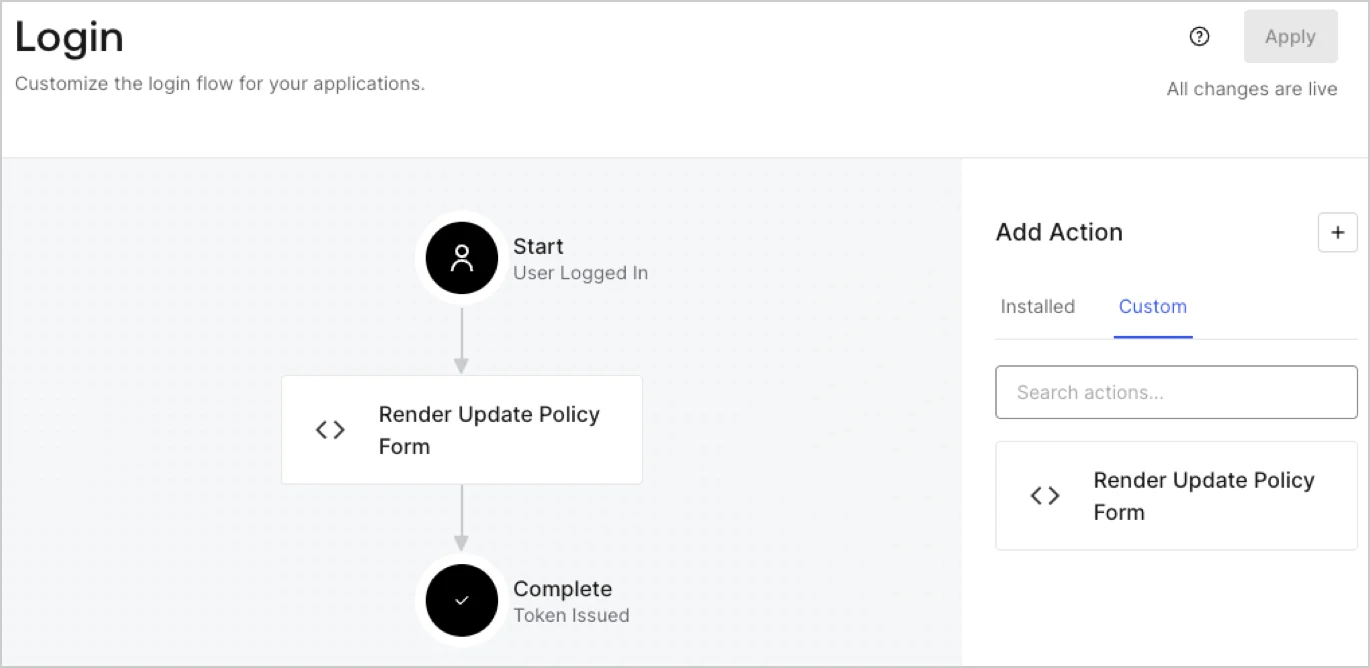
1. Navigate to **Auth0 Dashboard > Actions > Flows > Login.**
2. Select the **+** icon and Select **Build from scratch**:

   * **Name**: Enter `Render Update Policy Form`.
   * **Trigger**: Select `Login / Post Login`.
   * **Runtime**: Select the recommended version.
3. Select **Create**.

To configure the post-login Action:

1. Delete the existing code from the Code editor.
2. Paste the form render code into the Code editor.
3. Edit the code to define the conditional logic that will render the form.

   ```javascript lines theme={null}
   /**
   * @param {Event} event - Details about the user and the context in which they are logging in.
   * @param {PostLoginAPI} api - Interface whose methods can be used to change the behavior of the login.
   */
   exports.onExecutePostLogin = async (event, api) => {
     const FORM_ID = 'REPLACE_WITH_YOUR_FORM_ID';

     if (event.user.app_metadata.privacy_policies !== true) {
       api.prompt.render(FORM_ID);
     }
   }

   exports.onContinuePostLogin = async (event, api) => { }
   ```

   <Callout icon="file-lines" color="#0EA5E9" iconType="regular">
     The example code above will render the form when a user is missing the app metadata `privacy_policies` property.
   </Callout>
4. Select **Deploy.**
5. Drag and Drop the **Render Update Policy Form** Action to the **Login** flow.
   <Frame>
     <img src="https://mintcdn.com/docs-staging-fix-docs-5525/WTZEjcV6kt_ISvtf/docs/images/cdy7uua7fh8z/5TOwDgevZsBqd7yZynUYWU/41ca909dc3007aed4f40ff794a05efa5/postlogin.png?fit=max&auto=format&n=WTZEjcV6kt_ISvtf&q=85&s=e1830469a44cc1159353a079c519202b" alt="Dashboard > Forms > Use Case > Render update policy form login action" data-og-width="1370" width="1370" data-og-height="668" height="668" data-path="docs/images/cdy7uua7fh8z/5TOwDgevZsBqd7yZynUYWU/41ca909dc3007aed4f40ff794a05efa5/postlogin.png" data-optimize="true" data-opv="3" srcset="https://mintcdn.com/docs-staging-fix-docs-5525/WTZEjcV6kt_ISvtf/docs/images/cdy7uua7fh8z/5TOwDgevZsBqd7yZynUYWU/41ca909dc3007aed4f40ff794a05efa5/postlogin.png?w=280&fit=max&auto=format&n=WTZEjcV6kt_ISvtf&q=85&s=80cc158f218c179379fe33d64e363db1 280w, https://mintcdn.com/docs-staging-fix-docs-5525/WTZEjcV6kt_ISvtf/docs/images/cdy7uua7fh8z/5TOwDgevZsBqd7yZynUYWU/41ca909dc3007aed4f40ff794a05efa5/postlogin.png?w=560&fit=max&auto=format&n=WTZEjcV6kt_ISvtf&q=85&s=02607ed509527777e195c52ac60579de 560w, https://mintcdn.com/docs-staging-fix-docs-5525/WTZEjcV6kt_ISvtf/docs/images/cdy7uua7fh8z/5TOwDgevZsBqd7yZynUYWU/41ca909dc3007aed4f40ff794a05efa5/postlogin.png?w=840&fit=max&auto=format&n=WTZEjcV6kt_ISvtf&q=85&s=f3c56b5ce6e1bb88376d5008e3f41156 840w, https://mintcdn.com/docs-staging-fix-docs-5525/WTZEjcV6kt_ISvtf/docs/images/cdy7uua7fh8z/5TOwDgevZsBqd7yZynUYWU/41ca909dc3007aed4f40ff794a05efa5/postlogin.png?w=1100&fit=max&auto=format&n=WTZEjcV6kt_ISvtf&q=85&s=7d7666e913b386508099ef9bd41ddf1a 1100w, https://mintcdn.com/docs-staging-fix-docs-5525/WTZEjcV6kt_ISvtf/docs/images/cdy7uua7fh8z/5TOwDgevZsBqd7yZynUYWU/41ca909dc3007aed4f40ff794a05efa5/postlogin.png?w=1650&fit=max&auto=format&n=WTZEjcV6kt_ISvtf&q=85&s=1b484850d69df665f44c12c979413c13 1650w, https://mintcdn.com/docs-staging-fix-docs-5525/WTZEjcV6kt_ISvtf/docs/images/cdy7uua7fh8z/5TOwDgevZsBqd7yZynUYWU/41ca909dc3007aed4f40ff794a05efa5/postlogin.png?w=2500&fit=max&auto=format&n=WTZEjcV6kt_ISvtf&q=85&s=56e02003fcc0ce4c5bd3a73f62f9af33 2500w" />
   </Frame>
6. Select **Apply.**

### Test implementation

Test the implementation by following these steps:

1. Log in with an existing user whose app`_metadata` attribute `privacy_policies` does not have a value.
2. The post-login Action in the Login flow will render the form and prompt for acceptance.
3. Select **Auth0 Dashboard > User Management > Users,** locate the user and verify that the `app_metadata` attribute `privacy_policies` contains a `true` value and a timestamp.
